


Member
- Apr
- 142
- 2
+របៀបតម្លើងកម្មវិធី Autodesk 3ds Max 2022 នៅលើ windows
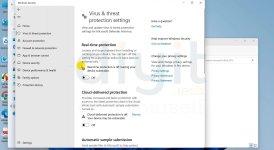
-ជំហ៊ានទី ១: យើងត្រូវបិទ windows defender ដែលយើងត្រូវចូលទៅកាន់
-Setting រួច update & Security ទៅកាន់ Windows Security ចុចលើពាក្យ Virus & threat protection
-បន្ទាប់មក ចុចទៅលើ manage setting ហើយចុចបិទ Real-Time Protection និង Cloud-Delivered protection
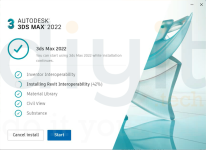
-ជំហ៊ានទី ២: Extract រឺ mount Autocad 3ds Max រួចតម្លើង 3ds Max 2022 ដែលមានឈ្មោះ setup នៅក្នុង folder ដែរបាន Extract រឺ Mount
-ជំហ៊ានទី ៣: បន្ទាប់ពីតម្លើងរួច យើងត្រូវចូលទៅកាន់ Folder Crack រួច copy file ឈ្មោះ 3dsmax.exe រួចចូលទៅកាន់ folder 3Ds Max ដែលបាន install រួច ហើយ Paste វានៅក្នុង folder នោះជាការស្រេច។
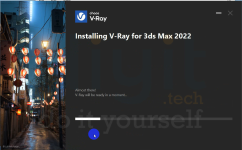
+របៀបតម្លើងកម្មវិធី V-Ray Advanced 5 for 3ds Max 2022
-ជំហ៊ានទី ១: Extract V-ray Advanced 5 for 3ds Max រួចតម្លើង vray_adv_51002_max2022_x64.exe
-ជំហ៊ានទី ២: បន្ទាប់ពីតម្លើងកម្មវិធី V-ray 5 រួចរាល់ហើយ យើងត្រូវចូលទៅក្នុង folder Crack រួច Copy
vray_v51002_fix.dlr ទៅកាន់ folder ( C:\Program Files\Autodesk\3ds Max 2022\plugins )
រឺ folder ( C:\Program Files\Autodesk\3ds Max 2022\plugins\vrayplugins )
vray_v50004_max_fix.dll ទៅកាន់ folder ( C:\Program Files\Chaos Group\V-Ray\3ds Max 2022\bin\plugins )
រឺ folder ( C:\Program Files\Chaos Group\V-Ray\3ds Max 2022\samples\3dsmax_plugins )
-ជំហ៊ានទី ១: យើងត្រូវបិទ windows defender ដែលយើងត្រូវចូលទៅកាន់
-Setting រួច update & Security ទៅកាន់ Windows Security ចុចលើពាក្យ Virus & threat protection
-បន្ទាប់មក ចុចទៅលើ manage setting ហើយចុចបិទ Real-Time Protection និង Cloud-Delivered protection
-ជំហ៊ានទី ២: Extract រឺ mount Autocad 3ds Max រួចតម្លើង 3ds Max 2022 ដែលមានឈ្មោះ setup នៅក្នុង folder ដែរបាន Extract រឺ Mount
-ជំហ៊ានទី ៣: បន្ទាប់ពីតម្លើងរួច យើងត្រូវចូលទៅកាន់ Folder Crack រួច copy file ឈ្មោះ 3dsmax.exe រួចចូលទៅកាន់ folder 3Ds Max ដែលបាន install រួច ហើយ Paste វានៅក្នុង folder នោះជាការស្រេច។
+របៀបតម្លើងកម្មវិធី V-Ray Advanced 5 for 3ds Max 2022
-ជំហ៊ានទី ១: Extract V-ray Advanced 5 for 3ds Max រួចតម្លើង vray_adv_51002_max2022_x64.exe
-ជំហ៊ានទី ២: បន្ទាប់ពីតម្លើងកម្មវិធី V-ray 5 រួចរាល់ហើយ យើងត្រូវចូលទៅក្នុង folder Crack រួច Copy
vray_v51002_fix.dlr ទៅកាន់ folder ( C:\Program Files\Autodesk\3ds Max 2022\plugins )
រឺ folder ( C:\Program Files\Autodesk\3ds Max 2022\plugins\vrayplugins )
vray_v50004_max_fix.dll ទៅកាន់ folder ( C:\Program Files\Chaos Group\V-Ray\3ds Max 2022\bin\plugins )
រឺ folder ( C:\Program Files\Chaos Group\V-Ray\3ds Max 2022\samples\3dsmax_plugins )
Attachments

Last edited: