

Member
- Apr
- 142
- 2
+របៀបតម្លើងកម្មវិធី Microsoft office 2016 នៅលើ windows 11
-ជាតំបូងយើងត្រូវបិទ windows defender ដែរយើងទៅចូលទៅកាន់
-Setting រួច update & Security ទៅកាន់ Windows Security ចុចលើពាក្យ Virus & threat protection
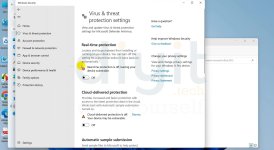
-បន្ទាប់មក ចុចទៅលើ manage setting ហើយចុចបិទ Real-Time Protection និង Cloud-Delivered protection
+បន្ទាប់ពីបិទ windows defender រួចរាល់ហើយ អ្នកត្រូវ
-Extract folder Microsoft Office 2016
-បន្ទាប់មកចូលទៅកាន់ folder ដែលយើងបាន Extract រួចចុចទៅលើ Microsoft.Office.Pro-Plus.2016x64 នៅខាងក្រោម
-បន្ទាប់ពីតម្លើងរួចយើងត្រូវ បិទ Internet របស់យើងដើម្បីធ្វើការ តម្លើង និង Crack កម្មវិធី
-ហើយចុច next រហូតដល់កន្លែង Install now និង Customize
Install now គឺយើងតម្លើងដោយតាម កម្មវិធីកំណត់
Customize គឺតម្លើងតាមអ្វីដែលយើងត្រូវការ
- Extract folder KMS_VL_ALL_AIO
-បើកកម្មវិធី KMS_VL_ALL_AIO.cmd នៅក្នុង folder នោះ
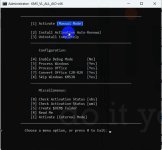
-ជ្រើសរើសយក
លេខ 1 ដើម្បី Crack Microsoft Office 1 ដង
លេខ 2 ដើម្បី Crack Microsoft Office និង winodws សារជាថ្មីដោយស្វិយប្រវត្តិ
-រង់ចាំរហូតដល់ Activate succesful ជាការស្រេច
-ជាតំបូងយើងត្រូវបិទ windows defender ដែរយើងទៅចូលទៅកាន់
-Setting រួច update & Security ទៅកាន់ Windows Security ចុចលើពាក្យ Virus & threat protection
-បន្ទាប់មក ចុចទៅលើ manage setting ហើយចុចបិទ Real-Time Protection និង Cloud-Delivered protection
+បន្ទាប់ពីបិទ windows defender រួចរាល់ហើយ អ្នកត្រូវ
-Extract folder Microsoft Office 2016
-បន្ទាប់មកចូលទៅកាន់ folder ដែលយើងបាន Extract រួចចុចទៅលើ Microsoft.Office.Pro-Plus.2016x64 នៅខាងក្រោម
-បន្ទាប់ពីតម្លើងរួចយើងត្រូវ បិទ Internet របស់យើងដើម្បីធ្វើការ តម្លើង និង Crack កម្មវិធី
-ហើយចុច next រហូតដល់កន្លែង Install now និង Customize
Install now គឺយើងតម្លើងដោយតាម កម្មវិធីកំណត់
Customize គឺតម្លើងតាមអ្វីដែលយើងត្រូវការ
- Extract folder KMS_VL_ALL_AIO
-បើកកម្មវិធី KMS_VL_ALL_AIO.cmd នៅក្នុង folder នោះ
-ជ្រើសរើសយក
លេខ 1 ដើម្បី Crack Microsoft Office 1 ដង
លេខ 2 ដើម្បី Crack Microsoft Office និង winodws សារជាថ្មីដោយស្វិយប្រវត្តិ
-រង់ចាំរហូតដល់ Activate succesful ជាការស្រេច
Attachments


Last edited: