

Member
- Apr
- 142
- 2
+របៀបតម្លើងកម្មវិធី Lumion Pro 9.5 នៅលើ windows 11
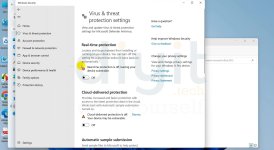
-ជាតំបូងយើងត្រូវបិទ windows defender ដែរយើងទៅចូលទៅកាន់
-Setting រួច update & Security ទៅកាន់ Windows Security ចុចលើពាក្យ Virus & threat protection
-បន្ទាប់មក ចុចទៅលើ manage setting ហើយចុចបិទ Real-Time Protection និង Cloud-Delivered protection
+បន្ទាប់ពីបិទ windows defender រួចរាល់ហើយ អ្នកត្រូវ
-Extract folder Lumion Pro 9.5
-យើងត្រូវ បិទ Internet របស់យើងដើម្បីធ្វើការ តម្លើង និង Activate កម្មវិធី
-បន្ទាប់យើងត្រូវ ចូលទៅកាន់ folder Lumion pro 9.5 ចុច Install ទៅលើកម្មវិធីដែលមានឈ្មោះថា lumion_9_5_lum9pro.exe
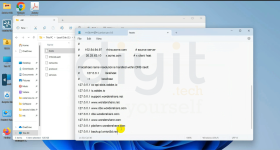
-បន្ទាប់ពី install lumion pro 9.5 រួចរាល់ សុំចូលទៅកាន់ folder C:\Windows\System32\drivers\etc ដើម្បីបង្កើតឃ្លាចូលទៅក្នុង file ១ ដែរមានឈ្មោះថា host ហើយវាយបញ្ចូលពាក្យដូចខាងក្រោម:
127.0.0.1 backup.lumion3d.net
127.0.0.1 license.lumiontech.net រួច save ជាការស្រេច
-ជំហ៊ានបន្ទាប់យើងត្រូវ block firewall នៅក្នុង windows defenders firewall with advanced Security
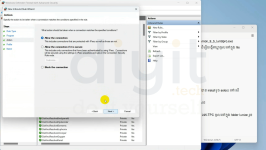
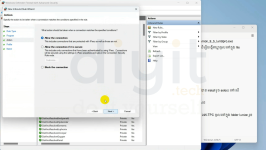
-ចូលទៅកាន់ inbound rules ដើម្បីបិទ Internet connection របស់ lumion pro 9.5 ដោយចុចទៅលើ
-New rule
-Select program -> next -> this program path: browse ហើយរកទីតាំង lumion Pro 9.5 ដែរបាន install រួច select ទៅលើ Application lumion Pro 9.5
-ចុច Next -> block the connection -> next រួចដាក់ឈ្មោះ lumion connection block ជាការស្រេច
-ចូលទៅកាន់ outbound rules រួចធ្វើតាម inbound rule ខាងលើ
-បន្ទាប់ពីបិទ inbound និង outbound រួចរាល់ អ្នកត្រូវ copy Lumion.pro.v9.5-TPC.exe នៅក្នុង folder L95-TPC ចូលទៅក្នុង folder lumion រួច run as administrator ហើយ patch វាជាការស្រេច
-ជាតំបូងយើងត្រូវបិទ windows defender ដែរយើងទៅចូលទៅកាន់
-Setting រួច update & Security ទៅកាន់ Windows Security ចុចលើពាក្យ Virus & threat protection
-បន្ទាប់មក ចុចទៅលើ manage setting ហើយចុចបិទ Real-Time Protection និង Cloud-Delivered protection
+បន្ទាប់ពីបិទ windows defender រួចរាល់ហើយ អ្នកត្រូវ
-Extract folder Lumion Pro 9.5
-យើងត្រូវ បិទ Internet របស់យើងដើម្បីធ្វើការ តម្លើង និង Activate កម្មវិធី
-បន្ទាប់យើងត្រូវ ចូលទៅកាន់ folder Lumion pro 9.5 ចុច Install ទៅលើកម្មវិធីដែលមានឈ្មោះថា lumion_9_5_lum9pro.exe
-បន្ទាប់ពី install lumion pro 9.5 រួចរាល់ សុំចូលទៅកាន់ folder C:\Windows\System32\drivers\etc ដើម្បីបង្កើតឃ្លាចូលទៅក្នុង file ១ ដែរមានឈ្មោះថា host ហើយវាយបញ្ចូលពាក្យដូចខាងក្រោម:
127.0.0.1 backup.lumion3d.net
127.0.0.1 license.lumiontech.net រួច save ជាការស្រេច
-ជំហ៊ានបន្ទាប់យើងត្រូវ block firewall នៅក្នុង windows defenders firewall with advanced Security
-ចូលទៅកាន់ inbound rules ដើម្បីបិទ Internet connection របស់ lumion pro 9.5 ដោយចុចទៅលើ
-New rule
-Select program -> next -> this program path: browse ហើយរកទីតាំង lumion Pro 9.5 ដែរបាន install រួច select ទៅលើ Application lumion Pro 9.5
-ចុច Next -> block the connection -> next រួចដាក់ឈ្មោះ lumion connection block ជាការស្រេច
-ចូលទៅកាន់ outbound rules រួចធ្វើតាម inbound rule ខាងលើ
-បន្ទាប់ពីបិទ inbound និង outbound រួចរាល់ អ្នកត្រូវ copy Lumion.pro.v9.5-TPC.exe នៅក្នុង folder L95-TPC ចូលទៅក្នុង folder lumion រួច run as administrator ហើយ patch វាជាការស្រេច
Attachments

Last edited: