

Member
- Apr
- 142
- 2
+របៀបតម្លើងកម្មវិធី Movavi Video Editor Plus 15.4.0 នៅលើ windows
-ជំហ៊ានទី ១: យើងត្រូវបិទ windows defender ដែលយើងត្រូវចូលទៅកាន់
-Setting រួច update & Security ទៅកាន់ Windows Security ចុចលើពាក្យ Virus & threat protection
-បន្ទាប់មក ចុចទៅលើ manage setting ហើយចុចបិទ Real-Time Protection និង Cloud-Delivered protection
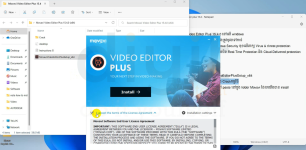
+បន្ទាប់ពីបិទ windows defender រួចរាល់ហើយ អ្នកត្រូវ
-Extract folder Movavi Video Editor Plus 15.4.0
-បន្ទាប់ពី Extract រួច យើងត្រូវតម្លើងកម្មវិធី MovaviVideoEditorPlusSetup_x64
-យើងត្រូវ បិទ Internet របស់យើងដើម្បីធ្វើការ តម្លើង និង Crackកម្មវិធី
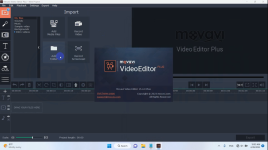
-ចូលទៅក្នុង folder crack រួច copy file ទាំងអស់
នោះទៅ paste នៅក្នុង folder Movavi ដែលយើងបាន install ជាការស្រេច។
-ជំហ៊ានទី ១: យើងត្រូវបិទ windows defender ដែលយើងត្រូវចូលទៅកាន់
-Setting រួច update & Security ទៅកាន់ Windows Security ចុចលើពាក្យ Virus & threat protection
-បន្ទាប់មក ចុចទៅលើ manage setting ហើយចុចបិទ Real-Time Protection និង Cloud-Delivered protection
+បន្ទាប់ពីបិទ windows defender រួចរាល់ហើយ អ្នកត្រូវ
-Extract folder Movavi Video Editor Plus 15.4.0
-បន្ទាប់ពី Extract រួច យើងត្រូវតម្លើងកម្មវិធី MovaviVideoEditorPlusSetup_x64
-យើងត្រូវ បិទ Internet របស់យើងដើម្បីធ្វើការ តម្លើង និង Crackកម្មវិធី
-ចូលទៅក្នុង folder crack រួច copy file ទាំងអស់
នោះទៅ paste នៅក្នុង folder Movavi ដែលយើងបាន install ជាការស្រេច។
Attachments

Last edited: